
Geosetter Kartenmodul reaktivieren
Hintergrund: Fehlermeldung seit 30.11.2018:
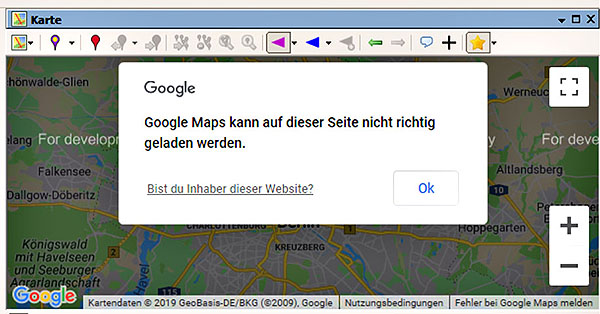
Grund: ⇒⇒⇒ Google hat ein neues Abrechnungsmodell für das Maps-API eingeführt.
Bisher war die Nutzung kostenfrei, zumindest für Privatanwender.
Daher haben etliche Webseiten-Anbieter diese API's von Google zur Kartendarstellung genutzt.
Ende 2018 hat Google aber folgendes Abrechnungsmodell eingeführt:
• Das Javascript API kostet 0,007 $ je Zugriff
• Das Geocoding API kostet 0,005 $ je Zugriff
Da Google einen Freibetrag von 200 $ monatlich gewährt bleiben bis zu
• Das Geocoding API kostet 0,005 $ je Zugriff
Für Privatpersonen sollte das locker reichen, nicht aber für Anbieter erfolgreicher Webseiten, wie Geosetter.
Problem Lösung:
Ich suchte nach einer Möglichkeit, den API-Key von Geosetter durch meinen persönlichen API-Key zu ersetzen.Zufällig entdeckte ich, daß durch den Geosetter-Autor eine Lösung angeboten wird.
Hinweis: Diese Anleitung wird nicht mehr angeboten, funktioniert aber mit der derzeit aktuellen Version 3.5.3 weiterhin.
Es geht noch einfacher, wenn man folgende Karten-Datei runterlädt (rechte Maustaste) und editiert.
In diese Karten-Datei muß der persönliche Google-Maps-API-Key eingetragen werden, in Zeile 10, ..... key= ....
Je nach den Google-API-Key-Restrictions kann die Datei auf dem lokalen Rechner verbleiben,
Empfehlung: Datei auf dem lokalen Rechner, keine Anwendungs-Einschränkungen notwendig.
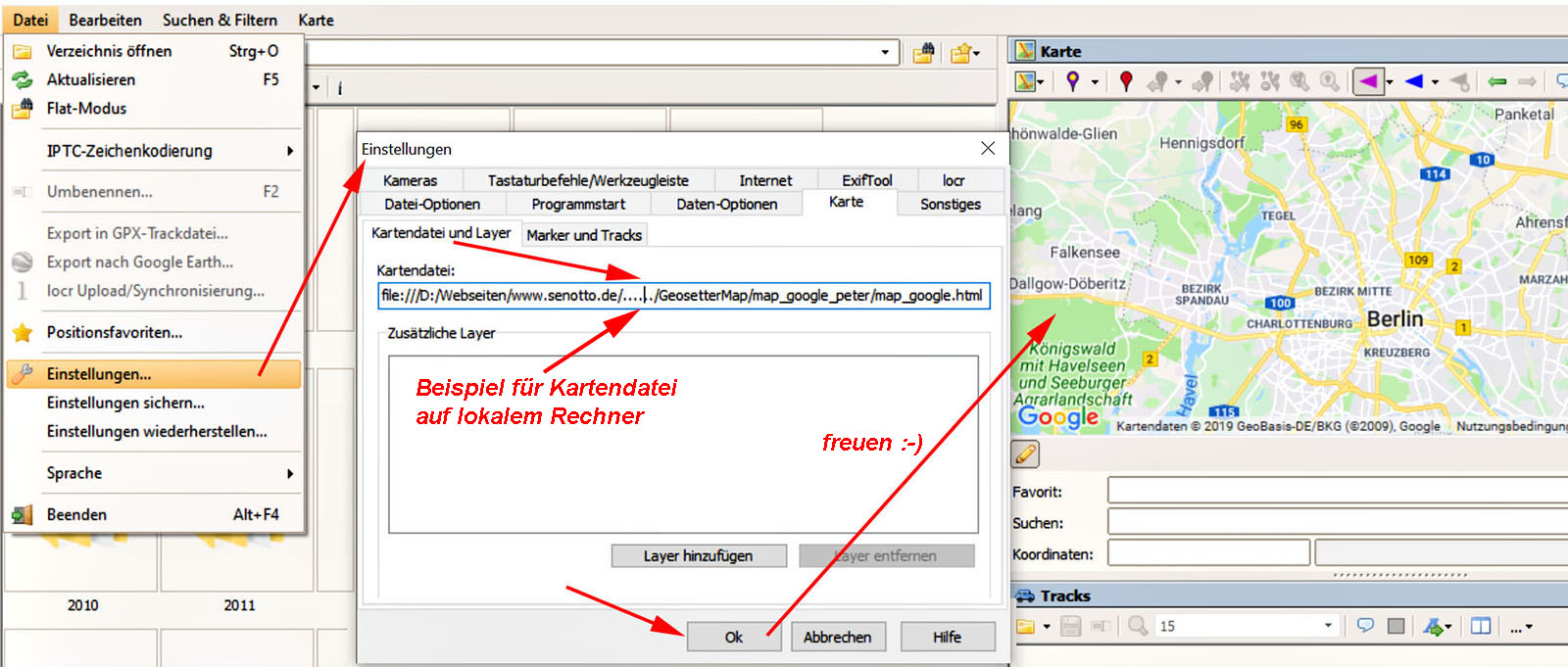
Der Speicherort der Datei muß in den Geosetter-Einstellungen angegeben werden, siehe weiter unten .....
Kurzanleitung für Windows 10 mit nützlichen Links:
Google-Account erstellen bzw. anmelden:
• https://accounts.google.com
• https://cloud.google.com/maps-platform/user-guide/
• https://developers.google.com/maps/billing/understanding-cost-of-use#billing-overview
• https://cloud.google.com/maps-platform/pricing/sheet/
• https://developers.google.com/maps/documentation/javascript/usage-and-billing
• https://developers.google.com/maps/documentation/geocoding/usage-and-billing
• https://cloud.google.com/billing/docs/how-to/budgets
• https://cloud.google.com/apis/docs/capping-api-usage
• https://cloud.google.com/maps-platform/user-guide/
• https://developers.google.com/maps/billing/understanding-cost-of-use#billing-overview
• https://cloud.google.com/maps-platform/pricing/sheet/
• https://developers.google.com/maps/documentation/javascript/usage-and-billing
• https://developers.google.com/maps/documentation/geocoding/usage-and-billing
• https://cloud.google.com/billing/docs/how-to/budgets
• https://cloud.google.com/apis/docs/capping-api-usage
Google Maps Api Key anfordern:
• https://www.webtimiser.de/google-maps-api-key-erstellen/
• https://cloud.google.com/maps-platform/#get-started
• https://console.cloud.google.com/google/maps-apis/overview
• https://developers.google.com/maps/billing/important-updates
• https://mapsplatformtransition.withgoogle.com/
• https://console.cloud.google.com/cloud-resource-manager
• https://developers.google.com/maps/documentation/javascript/get-api-key
• https://cloud.google.com/billing/docs/how-to/manage-billing-account
• https://console.cloud.google.com/apis/credentials
• https://console.cloud.google.com/apis/library
• https://console.cloud.google.com/apis/library/geocoding-backend.googleapis.com?q=geocoding
Keine Anwendungseinschränkungen, da nur eigener Rechner den Key hat (map_google.html).• https://cloud.google.com/maps-platform/#get-started
• https://console.cloud.google.com/google/maps-apis/overview
• https://developers.google.com/maps/billing/important-updates
• https://mapsplatformtransition.withgoogle.com/
• https://console.cloud.google.com/cloud-resource-manager
• https://developers.google.com/maps/documentation/javascript/get-api-key
• https://cloud.google.com/billing/docs/how-to/manage-billing-account
• https://console.cloud.google.com/apis/credentials
• https://console.cloud.google.com/apis/library
• https://console.cloud.google.com/apis/library/geocoding-backend.googleapis.com?q=geocoding
Folgende API's freischalten: Geocoding API & Maps JavaScript API.
Kartendatei in den Geosetter-Einstellungen deklarieren:
Anmerkungen an Peter